Get started
Install
TwinRobo needs Python 3.12 (inherited from DeepLens) and a CUDA GPU for practical speeds.
conda create -n twinrobo python=3.12 -y && conda activate twinrobo
pip install "twinrobo-core[mujoco]"   # TwinRobo, DeepLens, MuJoCo and NVIDIA Warp
With Isaac Sim 6.1 instead (Ubuntu 22.04 or later; in an environment of its own, since Isaac Sim brings its own MuJoCo):
From PyPI; release notes.
Other simulators
LIBERO itself is used from a checkout (LIBERO_ROOT). RoboCasa needs
robosuite 1.5 and gets its own environment (details).
Isaac Sim installs from PyPI (above) or runs in NVIDIA's container, with TwinRobo on
Isaac's own Python and torch (details):
Mount a real camera on a robot
Pick a camera from the catalog, mount it on a robot link, and render what it
would record, here in robosuite's PickPlace scene (pip install -e ".[libero]"
brings robosuite; no LIBERO checkout needed):
import robosuite

from twinrobo import CameraSpec, CameraTwin, CatalogRegistry
from twinrobo.plugins.mujoco import MujocoCameraTwin, RobosuiteRenderer, to_uint8
from twinrobo.plugins.mujoco.mounts import CameraMount, mounted

env = robosuite.make(
    "PickPlace",
    robots="Panda",
    has_renderer=False,
    has_offscreen_renderer=True,
    use_camera_obs=False,
)
env.reset()

# 1. Pick a real camera from the catalog (here read out at 960x600).
path = CatalogRegistry().resolve("stereolabs/zed-x/2.2mm")
twin = CameraTwin.from_spec(CameraSpec.from_yaml(path, width=960, height=600))

# 2. Mount it on a robot link: position (m) and yaw/pitch/roll (deg) in the link's frame.
wrist = CameraMount("wrist", body="robot0_right_hand", pos=(0.08, 0, 0), rpy_deg=(67, -48, 173))

# 3. Render what that camera would record.
with mounted(env.sim.model._model, env.sim.data._data, wrist) as host:
    frame = MujocoCameraTwin(twin, RobosuiteRenderer(env), camera=host).get_frame(force_depth=True)

image = to_uint8(frame.rgb)          # the real camera's image, uint8 [H, W, 3]
pinhole = to_uint8(frame.rgb_ideal)  # the simulator's ideal pinhole, same camera
depth = frame.depth[0, 0]            # ground-truth z-depth (m): a label, the ZED X outputs none
The first call builds the lens's PSF bank with DeepLens (about 20 s on a GPU) and caches it; after that a frame takes a fraction of a second. The mount moves with the link, so it follows the robot as it acts or replays a demo.
examples/05_mount_camera_on_robot.py does this for three catalog cameras on
the same wrist mount:
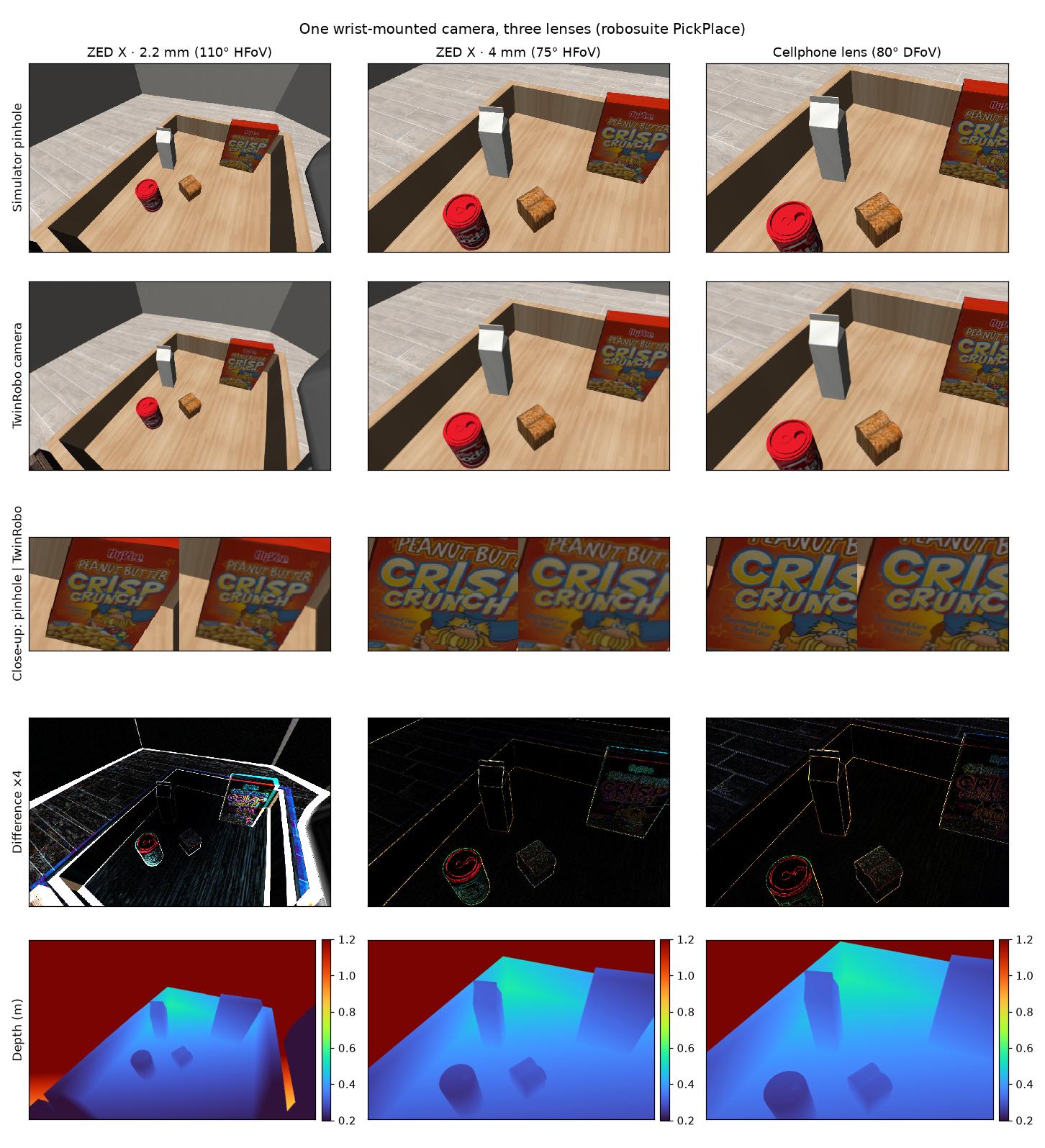
- Simulator pinhole / TwinRobo camera: each lens's own field of view. The ZED X 2.2 mm's wide lens shows its barrel distortion, which a pinhole cannot.
- Close-up: the same patch at native resolution; the real lens softens the lettering, as the camera would.
- Difference ×4: where the optics change the image.
- Ground-truth depth: the simulator's metric z-depth, aligned pixel for pixel with the
camera's image; a label for training, not an output of the camera (
force_depth=True).
Next steps
-
Trace real lens rays
Pass
render="raycast"toMujocoCameraTwin. Rendering methods -
Isaac Sim
The same twin on any USD camera prim, with both methods. Isaac Sim
-
A LIBERO policy's camera
CameraTwinLiberoEnvswaps observations in place; eval scripts run unchanged. LIBERO -
Your own camera
Copy a catalog spec, or add one for everyone. Cameras · Contributing